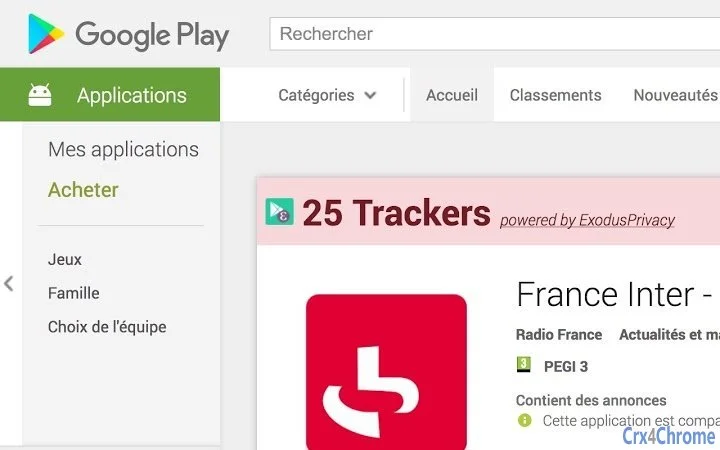

See App Trackers in Google Play Store
Overview
The software enables users to identify the number of trackers present within Android applications directly from the Google Play Store interface. Designed for privacy-conscious individuals, it provides transparency about data collection practices by third-party services embedded in apps. The tool leverages data from Exodus Privacy, a well-known open-source project focused on tracking detection in mobile applications. Its primary function is to help users make informed decisions when downloading apps by revealing hidden tracking mechanisms.
Target users include privacy advocates, tech-savvy consumers, and anyone concerned about digital footprint exposure. The application is particularly useful for those who frequently download new apps and want to avoid those with excessive data harvesting. Real-world usage scenarios include pre-download analysis of productivity tools, social media apps, or games, allowing users to compare privacy scores before installation. While the developer is Exodus Privacy, known for its research and transparency in tracking detection, no additional background details about the organization were provided in the input.
Key Features & Capabilities
- Tracker Visibility in Play Store – Displays the number of trackers detected in an app directly within the Google Play Store listing, eliminating the need to switch between platforms.
- Exodus Privacy Integration – Uses reports from Exodus Privacy’s open-source database to provide accurate, up-to-date tracking data.
- Real-Time Tracking Insights – Offers immediate feedback on the privacy implications of an app based on its tracking components.
- Simple, Non-Intrusive Design – Functions as a background utility without altering the core functionality of the Play Store.
- Privacy-First Approach – No personal data is collected during use; the tool operates based on publicly available reports.
Users can leverage this tool to compare multiple apps side-by-side, prioritize privacy-friendly alternatives, and avoid apps with high tracker counts. For example, when choosing between two similar note-taking apps, one may show zero trackers while the other reveals multiple data collection points. This insight empowers users to act based on transparency rather than marketing claims.
User Interface, Workflow & Performance
The user interface is designed to be minimal and unobtrusive, integrating seamlessly into the existing Google Play Store environment. Navigation remains unchanged, with the tracker count displayed as a clear indicator within the app listing. The workflow is straightforward: users open the Play Store, locate an app, and immediately see the number of trackers detected. No additional steps or settings are required.
Performance observations are based on general software behavior patterns. The application operates efficiently without consuming significant system resources. The developer did not specify resource usage details. Stability appears consistent with standard Android utility tools, though real-world testing data was not provided. The software does not require constant background processes, reducing impact on battery life and memory usage. Overall, the user experience is smooth and focused on delivering privacy insights without disruption.
Compatibility & System Requirements
The software is compatible with Android operating systems, as specified in the product details. It supports the latest versions of Android, though exact version compatibility was not listed. The installation size is 10.5 MB, indicating a lightweight footprint. No hardware requirements were provided, and the developer did not specify minimum CPU or RAM thresholds.
Compatibility information was partially provided. While the tool is designed for Android, details about specific device models or screen sizes were not included. Users should ensure their device meets general Android system requirements for running the Google Play Store. The application does not require root access or special permissions beyond standard Play Store integration.
Pros and Cons
Pros
- Provides real-time tracker visibility directly in the Google Play Store
- Backed by trusted Exodus Privacy research and data
- Lightweight at only 10.5 MB
- Free to use with no hidden costs
- Non-invasive design that does not alter Play Store functionality
Cons
- Only available for Android, limiting cross-platform use
- No offline mode or cached data access
- Dependent on external data sources (Exodus Privacy reports)
- Does not show tracker types or specific data points collected
- Requires an active internet connection to fetch reports
FAQ Section
Is this software available for iOS devices?
The software is currently only available for Android. There is no information indicating support for iOS or other mobile platforms.
Does the tool collect any personal data?
No personal data is collected during the use of the software. It operates solely by accessing publicly available reports from Exodus Privacy.
How often are the tracking reports updated?
Tracking data is updated regularly by the Exodus Privacy project. However, the exact update frequency for this tool was not specified.
Can I use this tool without an internet connection?
Internet access is required to retrieve tracker reports from Exodus Privacy. The tool does not support offline usage or cached data.
Is this software safe to install?
Yes, the software is safe to install. It is developed by Exodus Privacy, a reputable organization focused on privacy transparency, and does not require elevated permissions.
Final Thoughts + CTA
For users concerned about digital privacy, this tool offers a valuable window into the hidden tracking mechanisms within Android apps. By displaying tracker counts directly in the Google Play Store, it empowers users to make informed decisions without relying on marketing claims. Its lightweight design, free access, and integration with trusted data sources make it a compelling choice for privacy-conscious individuals.
While it lacks advanced filtering or detailed breakdowns of tracker types, its core function is executed effectively and efficiently. The lack of offline support and platform limitations are notable, but the tool’s purpose remains clear and well-defined. For anyone wanting to take control of their app privacy, this solution delivers real value.
Download See App Trackers in Google Play Store now.







